 Fixerpad
Built with the people who fix things.
Fixerpad was born and grew with appliance engineers, office staff and an international network that passes on repair jobs every day. Every screen is shaped on real work: the engineer on the calls, the office booking them in, the network handing out the jobs.
It fits you, not the other way round
Fixerpad does not force you or your company to change the way you work: it adapts to your needs, your methods, procedures and habits, and makes them quicker.
Your lists, your words
Job types, job statuses, lead sources and payment methods: you name them, you change them.
Roles that match your team
Engineer, office, accounts, supervisor, admin: everyone sees what they need, nothing more.
Only what you use
Switch modules on and off. A one-man band and a network of partners use the same app, set up differently.
From message to appointment
Customers text, send voice notes, ring up: each in their own way. Fixerpad listens to all of it and turns it into work.
Listens on every channel
WhatsApp and Telegram chats and voice notes, calls to the virtual receptionist: everything lands in one place.
Understands what is needed
AI makes sense of even the most varied and messy requests: the fault, the address, when the customer is in, an appointment to move.
Creates and acts
The job or the appointment is created in Fixerpad and the right actions start: suggested to your team, or automatic if you choose.
AI is a tool in your hands: it takes the repetitive work off you and helps you make better decisions. The final word is always yours.
Who it is for
The self-employed engineer
The whole office on your phone: jobs, diary, quotes, signed job sheets and payments, between one call and the next.
The repair company with a team
An office and several engineers. Each engineer sees only their own calls; office and accounts have their own views.
The repair network
You handle the jobs, not the repairs: partners, service areas, price lists, statements and what each partner owes you.
What Fixerpad does
Jobs and diary
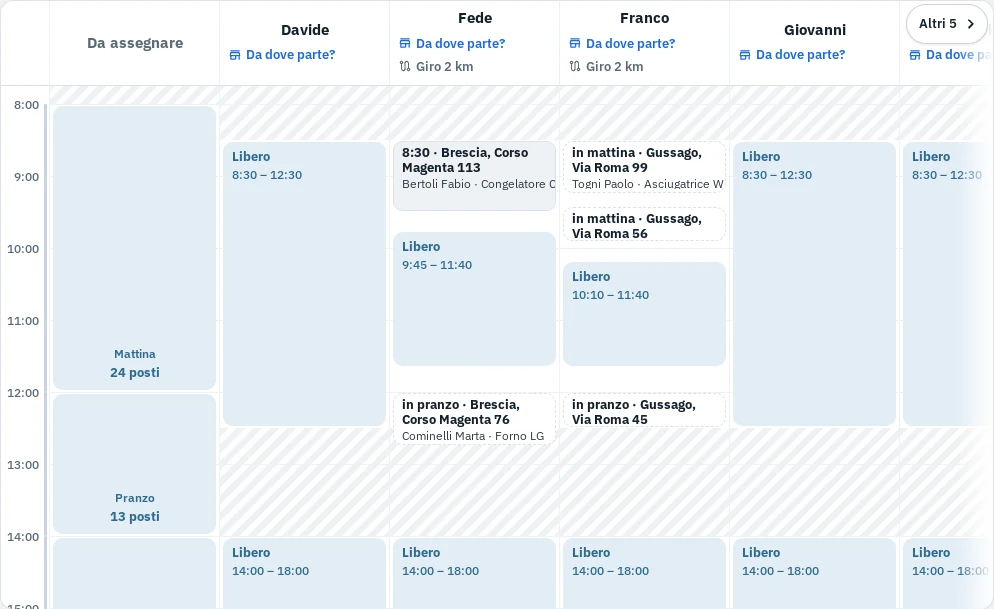
- From call to booking at a glance: the diary shows the next available slot, when each engineer is free and who is nearest, with what each one can fix.
- The whole job: first visit, quote, awaiting parts, return visit to fit the part, workshop repair, job complete.
- Warranty repairs: doing warranty work for manufacturers? Import and export the flow of jobs the brand sends you, each with its source, and keep warranty and chargeable jobs apart.
- Jobs from all your channels: website, phone, WhatsApp, Telegram, email and Google Ads, with the source of every job.
- Add to calendar: appointments straight into Google Calendar or Apple Calendar.
Out on the road
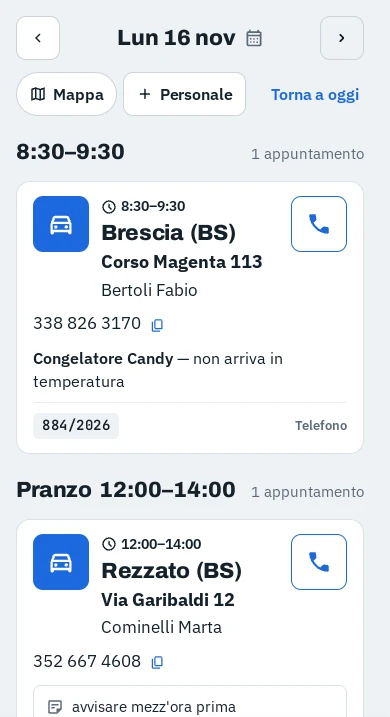
- Easy at the wheel: big buttons, directions with Google Maps or Waze, call the customer from the app.
- Works with no signal: keeps working offline and syncs when the signal is back.
- Rating plate: snap the rating plate and Fixerpad reads make, model and serial number.
- Dictate a new job: say who, where and what the fault is, and the job fills itself in.
Office and money
- Live updates: the office sees every call as it happens.
- Quotes and signed job sheets: every line of the quote, the customer signs on the screen, the PDF goes out by email, WhatsApp or Telegram from the phone.
- Payments taken on site: any payment method, and how much cash each engineer is carrying.
- Job costs: parts, job fees and other direct costs on every job, to see what you really make.
- Invoices and reports: invoices sent to Odoo, print an engineer's day or any report.
- Google reviews: ask happy customers for a review with a direct link.
For repair networks
- Live statements: statements for each partner, what they owe, payments and reminders.
- Channel profitability: what each channel brings in, from the first call to the payment: Google Ads, your websites and Google search, phone, social media too if you use it. You know where to spend your ad budget.
- Advanced price lists: for the same partner you can set different prices by combining several criteria: area, appliance, make, job type, call-out only. For example London different from the rest, Miele and Bosch dearer, air conditioning priced apart. Prices can change over time too: a new price list applies from the date you choose.
- AI-assisted dispatch: it suggests who to send each job to, and why, and if you want it assigns and sends the job on its own. You decide how far it goes, and you can always change its choice.
- WhatsApp, Telegram and virtual switchboards: jobs sent and answered on WhatsApp and Telegram, API for call centres.
- Every job to the right partner: towns and postcodes, appliances and makes of each partner, with exceptions. Fewer jobs turned down or cancelled.
Reports and numbers
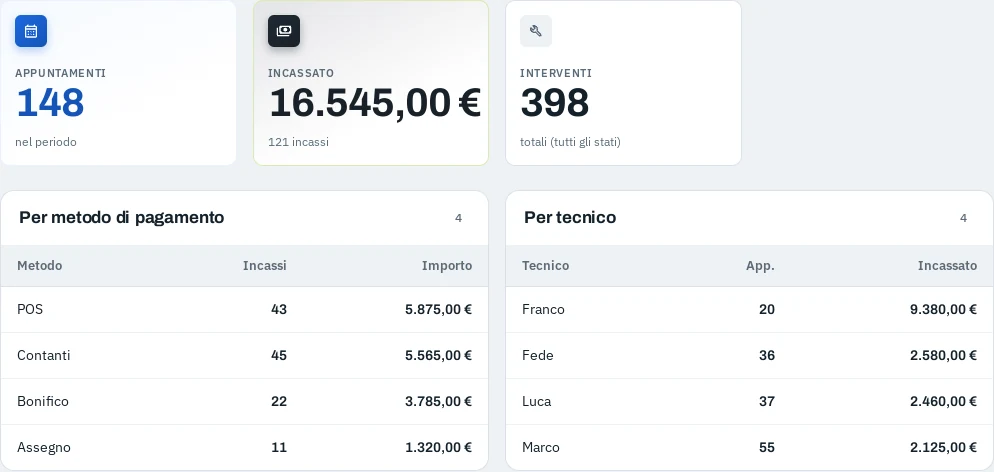
- Always up-to-date reports: jobs sent and confirmed, cancelled and why, by channel, area, appliance, make and engineer, with the trend over time.
- Summary and map: charts and a map on the same filters as the job list, to see at once where and how work is going.
- A report for each partner: every partner gets a link to their own report, with jobs received, jobs confirmed and the amount, and signs off with one tap. The partners in our network loved it from day one.
- Network by area: a map of covered and uncovered areas, and how many jobs each partner gets against their share.
- Print and export: print any report, download statements for Excel.
Coming soon
We are working on these. Tell us if you need one: our customers set the priorities.
- Engineer rounds Plan the day's round of each engineer.
- Clocking in Clock-in and clock-out for engineers.
- Van stock checklist The parts each engineer needs on the van for the day.
- Search Console Google search data for your website, or websites, compared with jobs and payments.
- More invoicing software Links to other invoicing and accounts software besides Odoo.
- Online booking On your website the customer picks their own slot.
- Messages in the app WhatsApp, Telegram and email sent and received without leaving the app.
- Engineer location Where engineers are right now, only with their consent.
How it works
We set it up with you
We create your company, engineers and areas, and import your customers and job history if you have them.
Your team logs in
Office on the computer, engineers on the phone, each with a personal link. Nothing to install.
You work as usual
Fixerpad follows your way of working. We stay with you to fine-tune it as you go.
Pricing
A monthly subscription per user, with packages for repair companies with more users. Cancel any time.
Set-up and import
- Company, engineers and areas set up for you
- Import of customers and job history
- Training for office and engineers
Price depends on the size of your company and the data to import.
Prices in euro, excluding VAT. Payment by bank transfer or PayPal. See Terms and Cancellation and refunds.
- Company
- Numeri Primi Srl
- Address
- Via Tiziano 32, 20145 Milano (MI), Italy
- VAT
- IT11621120960
- REA
- MI-2615239
- PEC
- [email protected]
- Support
- [email protected]